Contributor Eric Enge shares guidelines and handy workarounds you can follow to avoid indexing ‘too many’ faceted navigation pages.

On e-commerce sites, faceted navigation plays a critical role in allowing consumers to find the products they want quickly.
Major sites normally offer a variety of filters (show a subset of products), sort orders (show products in different orders) and pagination (break long lists of products into multiple pages).
From a search engine optimization (SEO) perspective, creating more pages that break out different aspects of products users might search on is generally a good thing. Offering more pages enables you to compete more effectively for the long-tail of search for your brand. These uniform resource locators (URLs) also make it easy for users to send links to friends or family members to view specific product selections.
Too much of a good thing
However, it’s also possible for there to be too much of a good thing. You can reach a point where you’re creating too many pages, and search engines will begin to see those incremental pages as thin content.
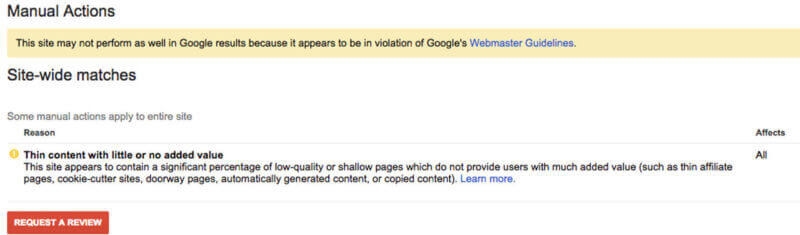
Go too far, and you can even receive a thin content penalty like this one:
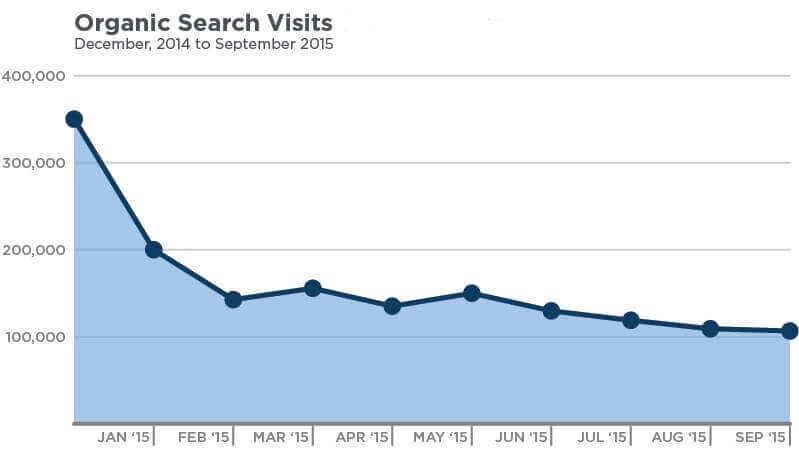
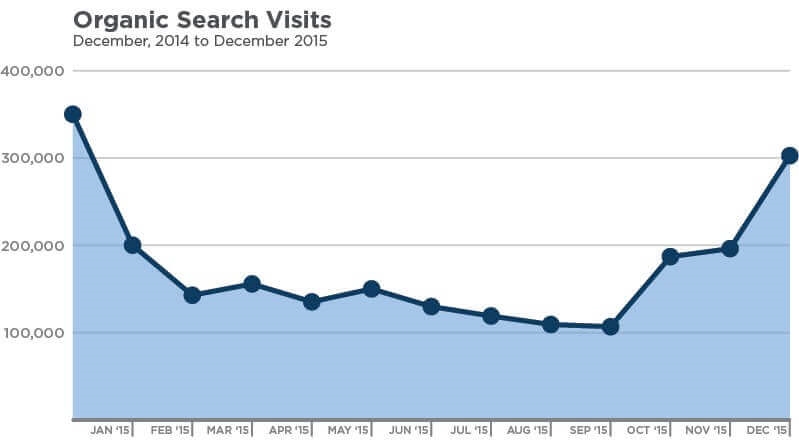
But, even without receiving a penalty, adding too many pages can result in a drop in traffic, similar to what you see here:
So how do you know what’s too much? That’s what I’ll address in today’s post.
Examples from prominent retail sites
Ever wonder how you get to the point of having too many pages? After all, pages are things that users might pick. Surely it would make sense to create and index all versions of your product pages.
To illustrate a bit further, let’s take a look at the potential number of pages on the Zappos site that relate to men’s Nike running shoes:
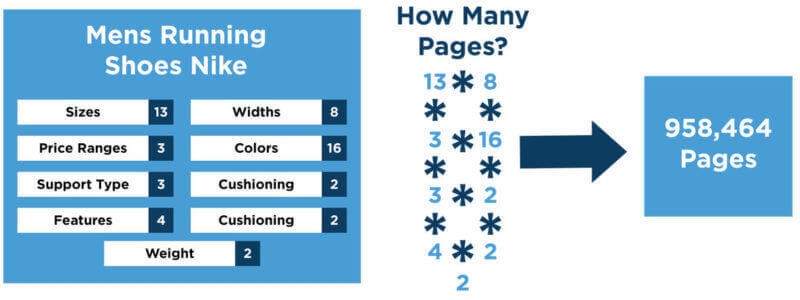
The numbers shown are the number of possible selections in each category. There are 13 possible sizes, eight widths, 16 different colors and so on. Multiplying this all out, that suggests there are over 900,000 potential pages in this category. That’s how many pages would get created if all combinations of selections were permitted together.
Even if Zappos filters out all the combinations for which there are no products, there are likely many combinations where there are only one or two products. All of these pages will look remarkably like the individual product pages for those shoes.
Let’s now take a look at an example of lipstick for sale on Amazon. Here is what we get there:
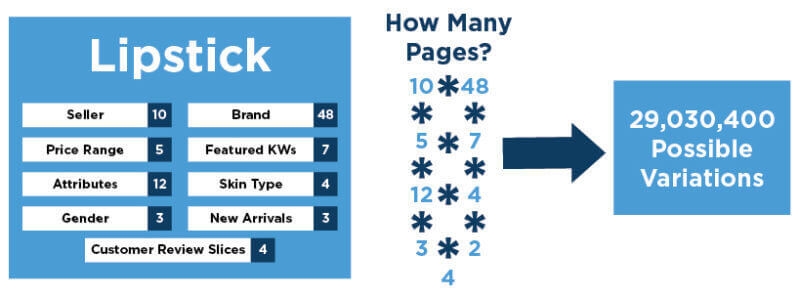
That’s a lot of different types of lipstick! As with the Zappos example, it’s likely that many combinations of filters will result in pages showing only one or two products, and this could be pretty problematic from a thin content perspective.
Let’s talk guidelines
Many of you may be thinking, “Sites like Amazon index all their pages, why can’t I?” Well, the simple answer is, because you’re not Amazon.
At some level, your reputation and the demand for your site play a role in the equation. Sites that see extremely high demand levels appear to get more degrees of freedom in how many pages they create via faceted navigation.
However, this does not always work to Amazon’s advantage. For example, if you search on “mens DKNY jeans,” you get the following result:
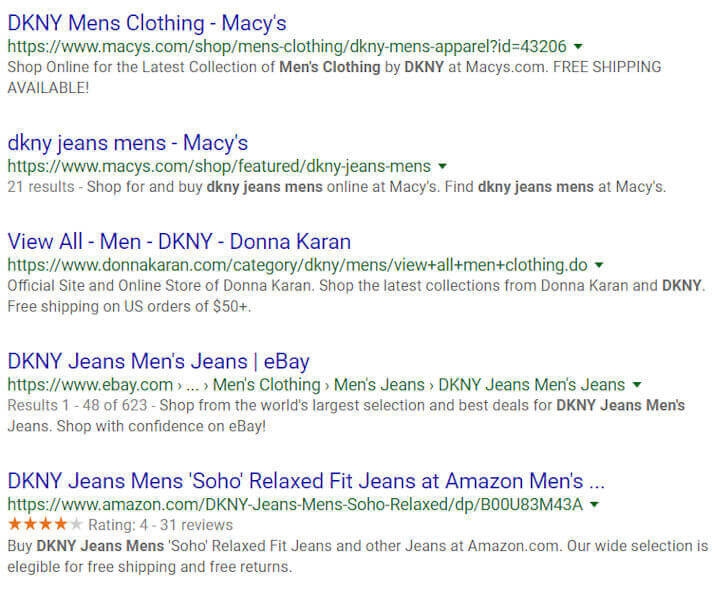
Every site that ranks has a category/filtered navigation page except for Amazon, which ranks with a product page. This strategy of indexing everything may be detrimental for Amazon as well; they are just able to rank with non-optimal pages and likely not as well as they could be if they made an attempt to restrict crawling to a reasonable set of pages.
For the record, Google disclaims the existence of any domain-level authority metric that would explain why sites like Amazon have more degrees of freedom around thin content than other lesser-known sites.
Google also says they treat Amazon (and other extremely visible sites) the same as every other site.
I’ll take their word on this, but that doesn’t mean there aren’t other metrics out there that are applied equally to ALL sites and cause some of them to be more sensitive to thin content than others.
For example, any user engagement level analysis would give an advantage to well-known brands, because users give brands the benefit of a doubt.
For lesser-known sites, there is clearly more sensitivity to the creation of additional pages in the Google algorithm. The traffic chart I shared above is an example of what happened to one site’s traffic when they did a large-scale buildout of their faceted navigation: They lost a full 50 percent of their traffic.
There was no penalty involved in the process, just Google having to deal with more pages on this than was good for this site.
Here is what happened when the issue was fixed:
Guidelines and help
So, what guidelines should you follow to avoid indexing too many faceted navigation pages?
Unfortunately, there is no one-size-fits-all answer. To be clear, if there is user value in creating a page, then you should create it, but the question of whether you allow it to be indexed is a separate one.
A good starting place is to set some rules up for indexation around the two following concepts:
- Don’t index faceted navigation pages with less than “x” products on them, where “x” is some number greater than 1, and probably greater than 2.
- Don’t index faceted navigation pages with less than “y” search volume, where “y” is a number you arrive at after testing.
How do you pick “x” and “y?”
I find the best way to do this is through testing. Don’t take your entire site and suddenly build out a massive faceted navigation scheme and allow every single page to be indexed. If you need the large scheme for the benefit of users, by all means do it, but block indexation for the more questionable part of the architecture initially, and gradually test increasing the indexable page count over time.
For example, you might initially start with an “x” value of 5 and a “y” value of 100 searches per month. See how that does for you. Once that’s clear, if everything looks good, you can try decreasing the values of “x” and “y,” perhaps on a category-by-category basis gradually over time.
This way, if you slip past the natural limit for your site and brand, it won’t show itself as a catastrophe, similar to the example I showed above.
Summary
As I’ve noted, set up your faceted navigation for users. They come first. But implement controls over what you allow to be indexed so you can derive the best possible SEO value at the same time.
The most common tool for keeping a particular facet out of the index is using a rel=canonical tag to point to the page’s parent category. This can work well for a site.
A second choice would be the NoIndex tag.
That said, my favorite approach is using asynchronous JavaScript and XML (AJAX) to minimize the creation of pages you don’t want in search engine indexes. If you know that you don’t want to index all the pages from a class of facets, then AJAX is a way that you can allow users to still see that content without it actually appearing on a new URL.
This not only solves the indexation problem, but it reduces the time that search engines will spend crawling pages you don’t intend to index anyway.
Another way to manage the crawling of facets, without using AJAX, is to disallow certain sets of facets in robots.txt.
This solution has the advantage of reducing crawling while still allowing search engines to return the pages in search results if other signals (in particular on-site and off-site anchor text) suggest the page is a good result for a particular query.
[Article on Search Engine Land.]
Opinions expressed in this article are those of the guest author and not necessarily Marketing Land. Staff authors are listed here.
About The Author

Eric Enge is the CEO of Stone Temple Consulting, an SEO consultancy outside of Boston. Eric also writes for The Digital Marketing Excellence blog and can be followed on Twitter at @stonetemple.
Marketing Land – Internet Marketing News, Strategies & Tips
(126)