

Is your PPC unprofitable, despite bringing in lots of leads? Columnist Jacob Baadsgaard explains his method for identifying and eliminating low-performing search terms.

AdWords is a great place to waste money. Google makes it so easy — a few minutes of effort, and you are well on your way to giving them your whole marketing budget.
Fortunately, all that money doesn’t have to go to waste. With a bit of finagling, it’s relatively easy to figure out which search terms have value and which ones are money pits — if you know what you’re doing.
To make things easy, I’ve boiled this analysis down into a simple four-step process. To show how this process works in practice, I’ll also use a recent client case study to illustrate each step.
The Client
This client provides a fantastic example of how much money you can waste on AdWords without realizing it. After running this analysis on their account, it became clear that they were wasting $50,000/month on ads that never produced a single conversion!
The client had been managing their PPC accounts in house for years, and these accounts were actually generating quite a few leads. Unfortunately, despite their high customer lifetime value (LTV), their cost per conversion was so high that they weren’t making any money.
Before coming to me, they had tried increasing their budget by 30 percent to see if they could improve profitability, but additional unprofitable traffic doesn’t equal additional profit, so their account was still struggling.
It was clear they had a problem. Given their budget and profit margins, their campaigns should have been a success, but something just wasn’t working.
Sound familiar?
Let’s take a look at the four-step process and what it uncovered for this client.
Step 1. Pull The Right Data
To use this technique properly, you need to start with the right date range.
Look at too long a date range and the data may reflect the results of old advertising strategy (ad copy, keywords, landing pages and so on) that may not be terribly relevant to your current strategy. On the other hand, if your date range is too short, you won’t have enough data to draw any meaningful conclusions.
Generally speaking, it’s best to look at the past 90 to 120 days of account history. For most accounts, this provides a good picture of the current state of the account and gives enough historical data to be useful.
The Client
For example, even without any data manipulation, the client’s 90-day history provides some valuable insights:

Over the past three months, they’ve spent $352,000 and produced one conversion per 500 impressions. At 8.4 million impressions, that’s a lot of leads.
The problem is, they only close one percent of their leads, which means that their cost per sale for this time period was around $2,000.
There are a lot of obvious opportunities for improvement in this limited snapshot (CTR, Avg. Pos., Click conversion rate, Lost IS), but for this post, let’s take a closer look at their biggest problem: worthless search terms.
2. Data Segmentation
Now that we have the right data set, we can dive into the details.
To start, let’s pull the search terms report:
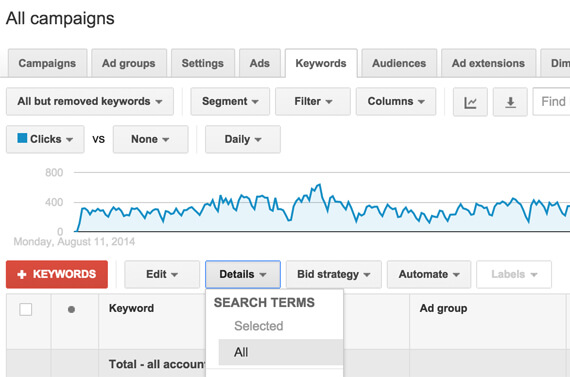
From there, hit “Download” to export the data into Excel. As great as AdWords is, Excel is where you really want to do your number crunching.
Side Note
Incidentally, the client thought the majority of their problems were due to poor mobile performance. Since Google makes it easy to break down campaign performance by device, I initially tried segmenting by device:
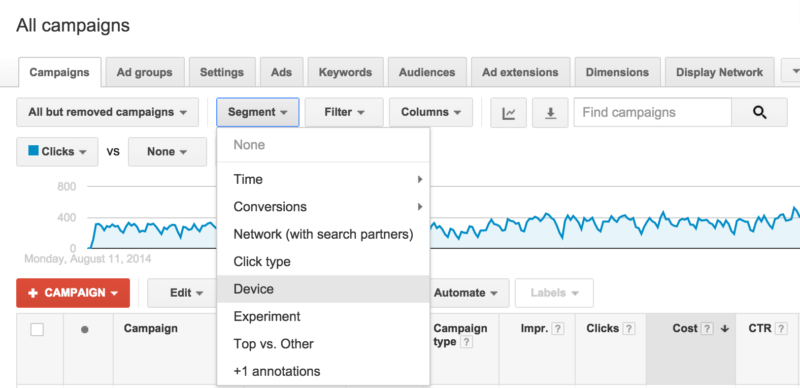
Usually, if your landing pages aren’t particularly well optimized for mobile, this report will show good click-through rates on mobile devices associated with poor conversion rates.
However, here’s how the client’s conversion rates differed across devices:

To everyone’s surprise, mobile was actually outperforming desktop. In addition to shocking the client, this finding further strengthened the theory that something was wrong with the search terms.
The question was, what?
3. Search Query Analysis
To identify your worthless search terms, you first need to set up a pivot table with your newly acquired data.
Pivot tables allow you to add a variety of filters to your data so you can stratify, sort and sum your data with ease. As a result, you can really get at the heart of what’s going on in your account.
(By the way, if you’ve never used pivot tables in Excel before, here’s a great guide.)
Once you’ve got your pivot table set up, filter for zero percent conversion rate:
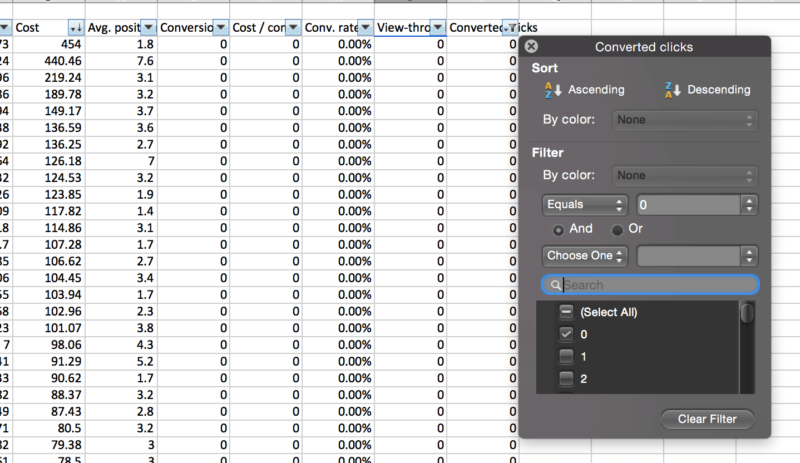
The resulting list will show you all the search terms that haven’t converted even once in your chosen time period.
If a search term hasn’t converted in the last three to four months, the odds are that it isn’t going to convert in the next three to four months. Sum up the cost column — how much money are you wasting on these search terms?
Trimming The Fat
This particular client’s zero-percent conversion rate search terms list went on for miles. In the last three months, they had spent $147,000 on search terms that didn’t produce a single lead.
That’s a lot of money.
Imagine how redirecting that money towards their productive search terms would have improved their campaign performance. Simply eliminating these terms would have dropped their cost per lead by 42 percent!
Cut cost per lead by 42 percent, and all of a sudden, those break-even campaigns start to become rather profitable.
4. Verify Your Findings
As helpful as this analysis can be, there are always additional factors you need to consider. Sometimes it may make sense to bid on search terms — for example, branded terms — even if they don’t produce conversions.
Alternatively, if you’ve got loads of traffic, it may be helpful to expand your definition of worthless search terms. Maybe a term that’s only produced one conversion in 500 clicks isn’t worth your while.
Regardless of which parameters you use to assess your results, this sort of data analysis can provide a lot of insight into which search terms deserve more budget and which deserve attention or elimination.
Here are some questions to consider:
- Do you have a lot of the same sorts of search terms in your poor performer list? If so, take a hard look at the relevance of your search terms to your product/offer.
- Are the majority of your poor performers pointing to the same landing page (or type of landing page)? If so, consider trying a more granular landing page strategy.
- Do you have poor performers with a low impression count that don’t match the type of audience you are trying to reach (e.g., location-specific queries that don’t apply to your business)? If so, your match types or negative search terms may need adjustment.
Looking at the effectiveness of your search terms can give you a lot of much-needed direction for campaign optimization, so use that pivot table to really get at the nitty-gritty of your search term strategy!
Conclusion
While not every client is wasting $50,000 a month on worthless search terms, this technique is an excellent way to uncover major money-sucking flaws in your campaigns.
Even if your campaigns seem to be running well, take 15 minutes and give them a quick checkup. You might be surprised at the opportunities you find.
You’ve heard my two cents, now I want to hear yours.
What sort of search term problems do you commonly see? How do you track down and eliminate problems with your campaigns?
[Refer to the article on Search Engine Land.]
Some opinions expressed in this article may be those of a guest author and not necessarily Marketing Land. Staff authors are listed here.

(Some images used under license from Shutterstock.com.)
Marketing Land – Internet Marketing News, Strategies & Tips
(67)