
 Elisa Silverman
Facebook recently rolled out new functionality on its Author Tag to make it easier for readers to follow pages and writers they like. As a freelance writer, I don’t hate this. But it sounds a bit similar to Google Authorship, which was snatched away.
So what’s going on here? What’s Facebook up to?
Why Is Facebook Doing This When Google Authorship Failed?
In case you’ve forgotten, Google Authorship was the function that presented the author’s photo, name and some Google+ info by their article link that came up in search results. The theory was that seeing the writer of the piece would lend credibility to it and increase clicks on that link.
The increased clicks never came.

The clicks never came.
After running it for three years, Google did away with it because they didn’t see any lift in clicks where Google authorship was implemented. They also found it didn’t translate well to mobile, which may account for no appreciable lift in clicks.
These were the strikes against those who took the time to implement Google Authorship on their sites. The third strike was that very few sites installed this option in the first place. So Google canceled it.
While Google had seen its Authorship tool as a means to augment the credibility of the author and steer readers to a specific choice among search results, Facebook’s version seems more a way to make it easier for readers to find content from authors they decide they like after reading the article.
Thus Facebook Authorship isn’t about getting that first click. It’s about sparking a relationship between writer and reader in the “micro-moment” (dare I say) when a reader has just shown interest in that writer. It’s a means to capture their attention for future articles.
What Facebook Authorship Does
With the Author Tag, the author’s name appears with the article anytime someone posts it in Facebook, even if the poster didn’t specifically tag the author. Even better, the author’s name is a link to their Facebook profile or page, where the interested reader can now “Follow” or “Like” them.

Now, when fascinating Friend A posts another fascinating article, you can click on the Follow button to easily start following that fascinating writer so their future articles come directly into your News Feed. Then, you’ll be the fascinating Friend sharing fascinating articles.
This is why publishers and writers will love the Author tag. It’s an amazing tool to expand the reach of your work and grow your persistent audience.
How Can I Implement Facebook Authorship
As noted earlier, Google Authorship had a low adoption rate. Perhaps because it was a bit of a chore to implement. Facebook doesn’t want to repeat that mistake.
First decide whether you want to promote your Facebook profile or page. Then you’ll enter the full URL for your choice in the article:author tag. Take a look at the HTML code you’ll use:
 Facebook Authorship HTML code
If you’re editing an HTML document, just include this line. If you want to implement Facebook Authorship via your CMS (e.g WordPress, Drupal, etc) – here’s a link to a great post that has separate instructions for a number of CMS systems.
If You’re Using Your Profile Page – Make Sure You’re Set Up to be Followed
If you’re going to use the author tag to link back to your profile page, you need to have enabled Following in Facebook. Facebook limits you to 5000 friends; that is, mutual connections.
You can have your profile followed (a la Twitter) by an unlimited number of people. Anyone can chose to follow you. It’s not like “friending” where each of you have to agree to create the connection. Once someone does follow you, then your public posts will appear in their News Feeds.
Hence the potential awesomeness of Facebook Authorship to grow your audience.
Here’s how you enable Following on your Facebook profile:
Go to ‘Settings’ on your Facebook page.
Click on ‘Followers’
Select ‘Everybody’ from the ‘Who Can Follow Me’ dropdown

Enabling Followers on Facebook
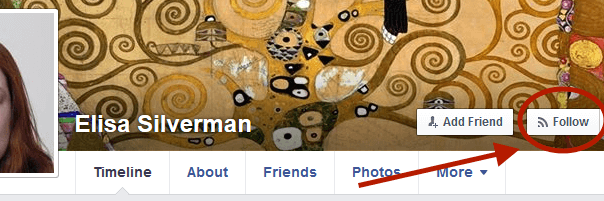
Once you’ve enabled following, the “Follow” button should appear at the of your profile. Like this:
 Facebook Profile Follow Button
Don’t worry. People who follow you can only see your public posts. Once you set this up, you need to make sure you’re selecting the right audience for each post so your private musings don’t go wide.
Who Should Use Facebook Authorship?
Any blogger, journalist, or writer who wants to build an audience. Facebook remains the undisputed king of referral traffic, but it also wants to keep visitors within Facebook. By making it easy for people to find the content they want directly in Facebook, they have less reason to look around the rest of the interwebs.
People are still going to search for new content on other platforms. Yet Facebook Authorship definitely provides the opportunity for writers to create ongoing engagement with a growing audience, and for readers to stay stocked with content they’ll like.
Digital & Social Articles on Business 2 Community(122)