
I’m going to confess something to you. It’s a bit embarrassing, but, I’m going to do it anyway. I’m a seasoned digital professional and I’ve been on Twitter since 2009. But, I had a “revelatory” Twitter experience about a year or so ago. At IBM, I had a really great team. I added to that great team when I hired Ian Gertler – one of the best social media strategists I know. Ian and I became fast friends. But, one day, he approached me and we had the following conversation.
Ian: “Taylor, I have a problem with you.”
Me: A little surprised “Oh. Ok, Ian. What did I do?”
Ian: “Taylor, you’ve been on Twitter since 2009.”
Me: “Yep, Ian, I have.”
Ian: “And, you’re our digital leader.”
Me: “Yep, Ian, that’s right.”
Ian: “Then Taylor, why do you only have 30 Twitter followers!”
Dang, I was caught red-handed by one of my own employees. Well, the answer is complicated. Part of the answer is that for me Twitter is a little exhausting. It’s so hard for me to stay on top of status updates, retweets, Twitter conversations, etc. I’ve got a busy life – four kids, community service and, at the time, a busy job. I’m also not the type to gratuitously promote myself. So, when I was on Twitter, I was orchestrating successful programs and campaigns for my team, not for myself. I was the conductor who nobody really notices when you’re listening to a marvelous symphony in action.
Well, Ian’s encouragement got to me. I started my blog because I wanted to have my own content going to Twitter followers. I started to become more active on Twitter – looking for opportunities to engage. Needless to say, it’s been a VERY slow process. I have no idea how these guys with hundreds of thousands of followers got to where they were. But, I stumbled on something that has helped – a LOT!
Automating Twitter Content
A few months ago, I decided that I needed an easier way to get my Twitter posts out. Yes, I tried Buffer and Hootsuite – I like them both. They are great applications. But, I needed something that would get my content out repeatedly so that I could focus on engagement. I resolved to build it myself.
Once I decided to build it myself, playing around with the Twitter API, I found an add for a new social media service called “MeetEdgar”. It piqued my interested because MeetEdgar seemed to do most of what I wanted my application to do. I thought, “Well, let’s give it a try.” Two months later, I have a gazillion more followers, thanks to MeetEdgar.
Meet MeetEdgar
MeetEdgar is a service that lets you build up a content library and then it handles automated, repeated posting of your content. This is exactly what I was looking to build. Here are some of the features I had in mind when I found MeetEdgar:
- Create new posts and save to a content library
- Setup a frequency pattern for pushing content from the library out to Twitter
- System automatically publishes to Twitter
The reason I liked this approach is so that I can spend one day a week populating my library with interesting content I find, or my own blog posts. Then I don’t have to worry about scheduling and re-scheduling each one individually. I could just have the system schedule as frequently as I want and then it pulls from the content library.

Amazingly, this is exactly what MeetEdgar does, with a few other interesting features.
How MeetEdgar Works – In Detail
Let’s see exactly how MeetEdgar works.
1) Get your invite and signup
MeetEdgar is an invite-based service. I don’t know if this is for marketing hype, giving the appearance of invite scarcity, or if they are metering usage to accommodate technology infrastructure requirements. I, however, didn’t have a problem getting an invite.

2) Complete the “tutorial”
MeetEdgar has a guided tutorial that you must finish in order to access all the features. I didn’t like this part of the service for a couple of reasons. First, I didn’t know I was in tutorial mode. So, when I Googled for features, my interface didn’t match up to what I saw. I ended up sending a note to support, and then realized I was in “tutorial mode”. Second, I don’t like being forced to do anything! Just get past the tutorial and move on.
3) Load your content library
Start loading in your tweets to the content library. You can mark some tweets to go out only once. Otherwise, put them in whatever category is appropriate. MeetEdgar doesn’t allow you to create custom categories, so, do your best with theirs.

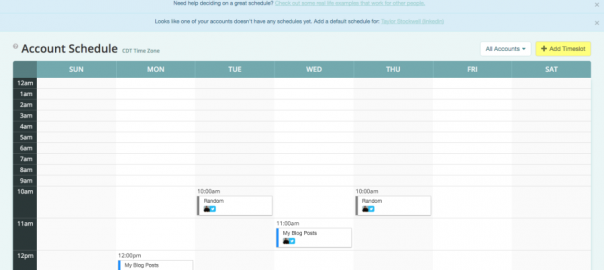
4) Schedule
Scheduling is easy, but, not what I expected. What you do is create entries on a calendar for when you want tweets to go out. Choose the category that MeetEdgar will pull from. Tweets will go out during that hour with randomly selected tweets in your library for the selected category. It’s fast and easy to set this up and allows you to go out as frequently as you’d like. There’s also a queue that allows you to see and manage what’s going out for the next two weeks.

Results From My Test
Here’s what my Twitter metrics looked like just one month into the test …

In one month, I increased my Twitter followers by 25%. More significantly, I gained 58 followers in one month, whereas I only gained 52 followers the entire year prior! (Yes, I’ve been a lame Twitterer.) Reach increased over the prior month by 854%. And, I only went in every week or so to add more content. So, instead of managing my Twitter account on a daily basis, I could focus on my crazy life and let MeetEdgar do the heavy lifting.
The Bottom Line
Auto publishing of rotating content was a huge win for my personal account. The $ 49/month price tag might be a bit steep for most individuals and small businesses. But, it’s dirt cheap when you consider the value in building your audience. MeetEdgar goes on one of my favorite tools lists! Nicely done, guys. Thanks for building a great, affordable product.
Digital & Social Articles on Business 2 Community(50)