
 Lindsey Stemann
Our first pit stop in LinkedIn when we begin working with our clients is LinkedIn’s Privacy & Settings. Since there are many ways to customize your experience in LinkedIn, we have written on the topic many times. It should come as no surprise when I recently went into my own Privacy & Settings to check on the status of my InMail messages that they were no longer displayed. Poof. Gone…Okay, I knew they had not completely disappeared, but where did LinkedIn put my information?
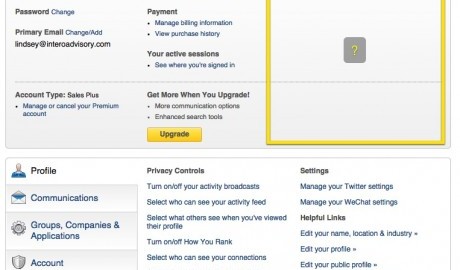
In the image below, the area within the yellow box used to be filled with information regarding my InMail status and my selection to use a LinkedIn Open Profile badge. Here is a view of my LinkedIn account Privacy & Settings now:

While I could have taken the detective route of exploring my LinkedIn account until I found where this information now lives, I took an alternative approach: I opened a help ticket through LinkedIn’s Help Center. By inquiring and attaching a screen shot (I used the image above), LinkedIn responded within a few hours with exactly the answer I needed.
To access your LinkedIn account, you will now want to hover over your picture in the top right corner of LinkedIn and click on “Account: [Subscription Level] Manage” to get more information about your current LinkedIn subscription.
Reminder: If your view is different than the screen shots in this post, then LinkedIn probably has not rolled out this update to your account yet. No problem! You are now in-the-know and will be ready to rock when the update occurs within your LinkedIn account.

LinkedIn has really cleaned up this next page (image below).
- Click “Learn more about your subscription” under “Account Type” to understand what your investment will get you. There are now tip sheets with SlideShare presentations.
- Find out when your next billing date is, billing history and manage your payment methods under “Billing Information.”
- (Here it is!) Find out how many InMail credits you have available under “Premium Features Settings.”
- Click “Learn more about this subscription” under “Other Accounts” to see what additional LinkedIn tools you may be missing out on.

While it may be a simple change, it is an important one. You should know the status of your LinkedIn account; from billing to InMail status to new subscription levels. As a member, you are LinkedIn’s biggest asset. LinkedIn wants you to have control over your account and your experience within their platform.
(226)