
Looking for ways to make your product listing ads stand out this holiday season? Columnist Todd Saunders has some tips.

We’ve all heard the classic holiday jingle about Kris Kringle’s holiday prep: First, he makes a list, then he checks it twice. (He’s gotta find out who’s naughty or nice!)
Believe it or not, I use a checklist of my own as I review my Google Shopping campaigns for the holiday season.
Unlike Search and Display, Shopping doesn’t give advertisers a ton of control over when ads will show and how much to pay. That’s why it’s so important to check and double-check that you’ve crossed your t’s and dotted your i’s.
Today, I’ll be sharing three Shopping strategies I’ve added to my checklist for the upcoming holiday season.
Take advantage of Showcase Shopping Ads
Google’s experiment with Showcase Shopping Ads and auto-play video are two of many indicators that the company is shifting toward a richer search experience. Long gone are the days of text-only ads!
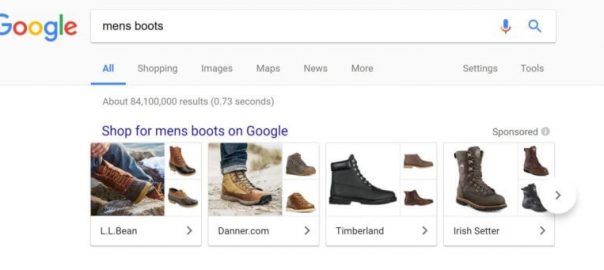
If you’re already running Shopping campaigns, give Showcase Shopping Ads a shot. This new ad format features interactive photo collages that showcase a store’s name and its most relevant products on search.
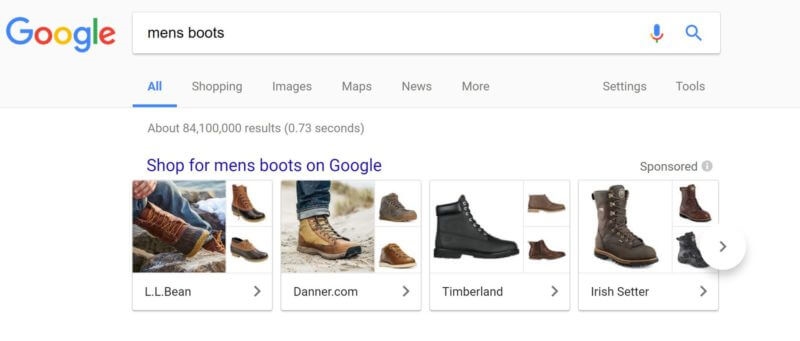
Showcase Shopping Ads in Google search results
Users who click on a Showcase Shopping Ad will be presented with a full-screen product feed, including details like special sales, average shipping times and contact info.
But before you get started, you have to make sure of a couple of things:
- You’re using the new Google AdWords experience, which is now available to everyone.
- You have a Google Shopping Campaign set up.
Like any other Shopping Ad, bidding can get a little tricky, because advertisers bid on Max Cost-Per-Engagement instead of keywords. An engagement occurs if someone clicks the Showcase Ad and spends more than 10 seconds on the ad, or if they click on a link within the expanded ad.
Segment your bids using priorities
Google Shopping ads may not work the same as standard text ads, but here’s the problem:
Advertisers aren’t segmenting their bids.
Since advertisers can’t bid on specific keywords, they’ll throw up their hands and let Google handle the rest. Not the smartest way to spend your precious ad dollars! Ideally, you’d want to place higher bids on keywords with higher purchase intent, which are generally more specific, long-tail keywords.
You can actually achieve this with priority settings. You can assign a priority level to each campaign: low, medium or high. If more than one product qualifies to show for an ad, the higher priority will always enter the auction first, regardless of bid.
You can segment your bids by adding negative keywords. Do this by creating three shopping campaigns of the same product, like so:
Campaign #1: GENERIC NON-BRAND
- Priority: HIGH
- Negative keywords: “running,” “basketball,” “nike”
- Your bids: LOW
- Possible conversion rate: LOW
Campaign #2: SPECIFIC NON-BRAND
- Priority: MEDIUM
- Negative keywords: “nike”
- Your bids: MEDIUM
- Possible conversion rate: MEDIUM
Campaign #3: BRANDED
- Priority: LOW
- Negative keywords: None
- Your bids: HIGH
- Possible conversion rate: HIGH
Here’s what will go down:
- All three campaigns qualify to enter the auction.
- Google surveys the highest-priority campaign for entry.
- The negative keywords “Nike” and “running” force Google to pass and consider the medium-priority campaign.
- The negative keyword “Nike” prevents the ad from matching and pushes it down to the low-priority campaign.
- The long-tail keyword with high purchase intent matches with the lowest priority campaign. Now you have a higher chance of winning that valuable conversion because your higher bid is going to place you higher in the search results.
Integrate a feed management tool
All Google Shopping campaigns require a Merchant Center data feed to list all the products you’re selling. If you’ve tried to set that up before, you know how annoying it can get, especially when you’re required to update your data feed once every 30 days.
And if you want optimal results, you might even have to update it daily. Nobody’s got time for that. Data feed tools automate the process and will undoubtedly save you some energy to tackle larger tasks at hand. (Personally, I’ve had good experiences with Go Data Feed, but there are a ton more worth checking out.)
Go forth and make money!
That was easy, right? Now, go ahead and start testing. If you don’t know where to begin, check out the way too early holiday testing guide to get started.
[Article on Search Engine Land.]
Opinions expressed in this article are those of the guest author and not necessarily Marketing Land. Staff authors are listed here.
About The Author

Todd is the CEO at AdHawk, a digital advertising software that aggregates and optimizes digital ad data. Before taking the startup plunge, Todd spent worked on the AdWords team at Google, where he helped high growth startups and small businesses with their digital advertising strategies. He is an expert at optimizing advertising accounts and improving ROI.
Marketing Land – Internet Marketing News, Strategies & Tips
(51)