
Every PPC advertiser on AdWords or Bing Ads is sitting on a gold mine of data; the search query report (SQR) or search terms report. Appropriately mining this data can increase revenue, improve conversion rates & help you better understand what potential customers are looking for.
Why Is The Search Query Report Important?
The important thing to remember is that keywords and search queries are different. Keywords tell the search engine when you would like your ad to show for a specific query. The keyword “nike basketball shoes” could trigger your ad to show for queries like “mens size 13 nike basketball shoes” or “how does nike manufacture basketball shoes”.
You can see that a query can be much more specific than a keyword and that allows you to take appropriate action. For the first query about size 13 shoes you could create a new keyword that would have ad copy specifically mentioning the size and that would send the person to a page of mens Nike shoes in size 13, which would be a great user experience and likely would convert at a higher rate.
For an informational query like our second example about how shoes are made, we may choose to enter a negative keyword such ad “manufacture” to not show our ads at all if we’re an ecommerce vendor who’s only interested in selling shoes (though perhaps Nike the brand might want to bid on that query to educate a potential concerned customer).
How Do I Find The Search Query Report
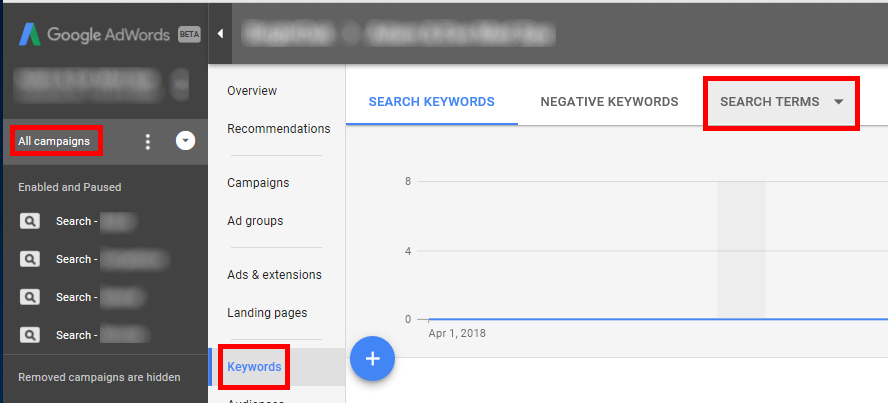
The two main platforms for keyword-based PPC advertising are AdWords and Bing Ads. To find this information in AdWords you will need to be logged into your account. Click on “All campaigns” in the lef-most navigation (or a specific campaign/ad group to get more specific). Next, click on “Keywords”. Finally, click on the “Search Terms” drop-down box at the top and select “Search terms”.
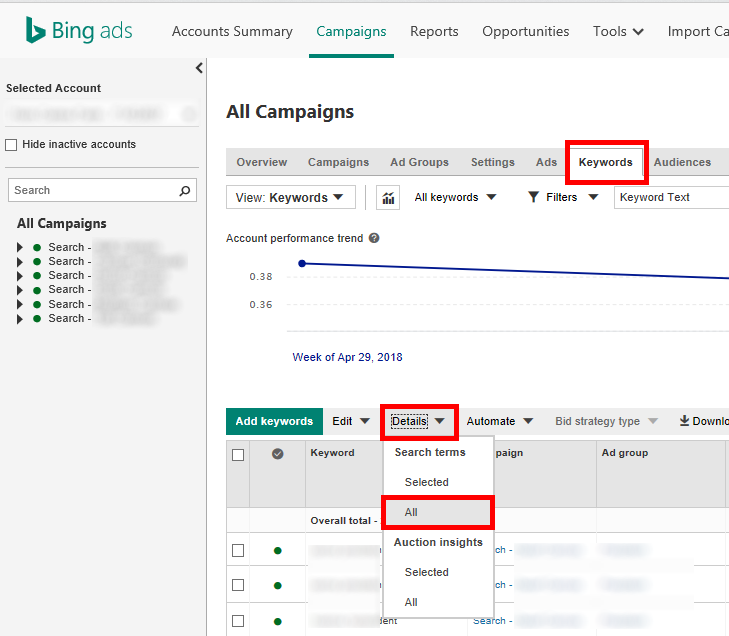
For Bing Ads, it’s basically the same idea, but you need to click the “Details” drop down to see your options for seeing search terms for all keywords or just the ones you’ve selected.
Now that you know how to find the report, what do you do with the information? You can scroll through and just exclude keywords that aren’t relevant. That’s a great way to start & get an intuitive feel for how things are going. But you’ll soon want to dig in deeper and that’s where filters can really help you isolate the good & bad.
Filter 1: Find Budget-sucking Vampire Keywords
This filter helps surface keywords that are spending money, but not turning into conversions/revenue. My one caution with this filter is that you ensure you’re using a long enough time period that you don’t pause a decent performer simply because of a bad spell. Start by giving it at minimum 30 days of data. The filter criteria are these: Cost > $0.00 and Conversions < 1 (for some reason there is no equals operator available). It will look like this:
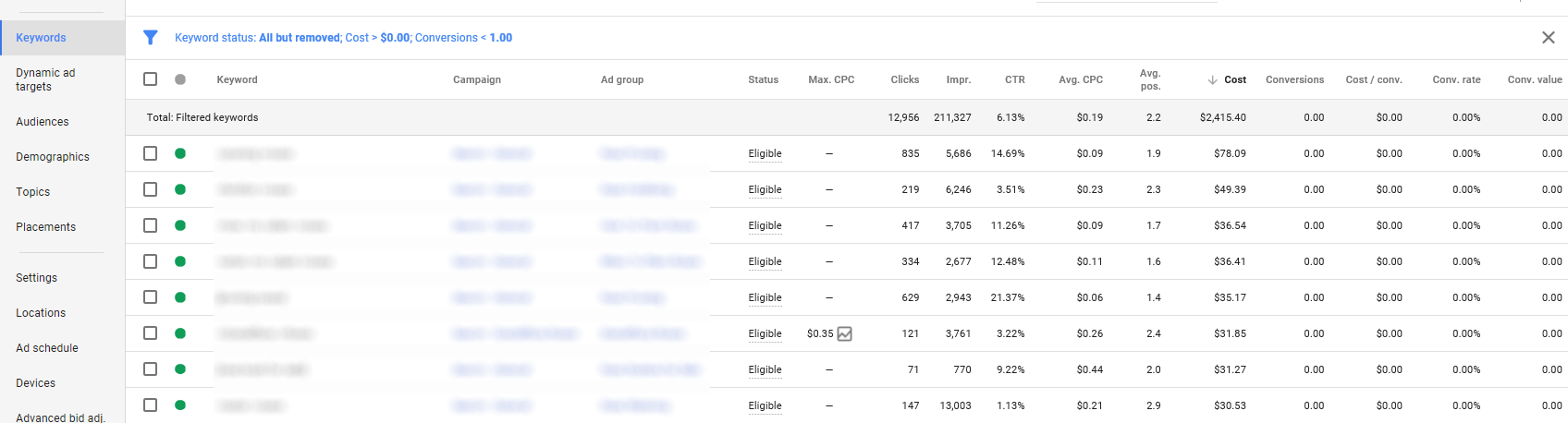
These are keywords that may seem great. You might feel they’re relevant and you want your ad to appear, but the data says they are sucking up budget and not delivering conversions. And even if you feel that each one individually is a small amount (in the screenshot above, the biggest cost is only $78) you should look at the total row for the filter. It can be hundreds or thousands of dollars.
Filter 2: Low Relevance Keywords
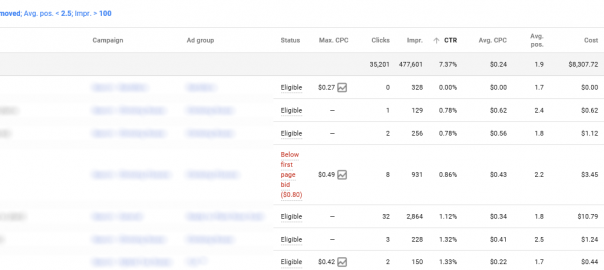
With Quality Score rewarding high CTR with lower costs/better position it’s important to keep an eye on low relevance keywords. The easiest way to locate these keywords is to look for keywords with a decent number of impressions, solid average position, but low CTR. So filter for average position less than 2.5, impressions greater than 100 and sort by CTR low to high.
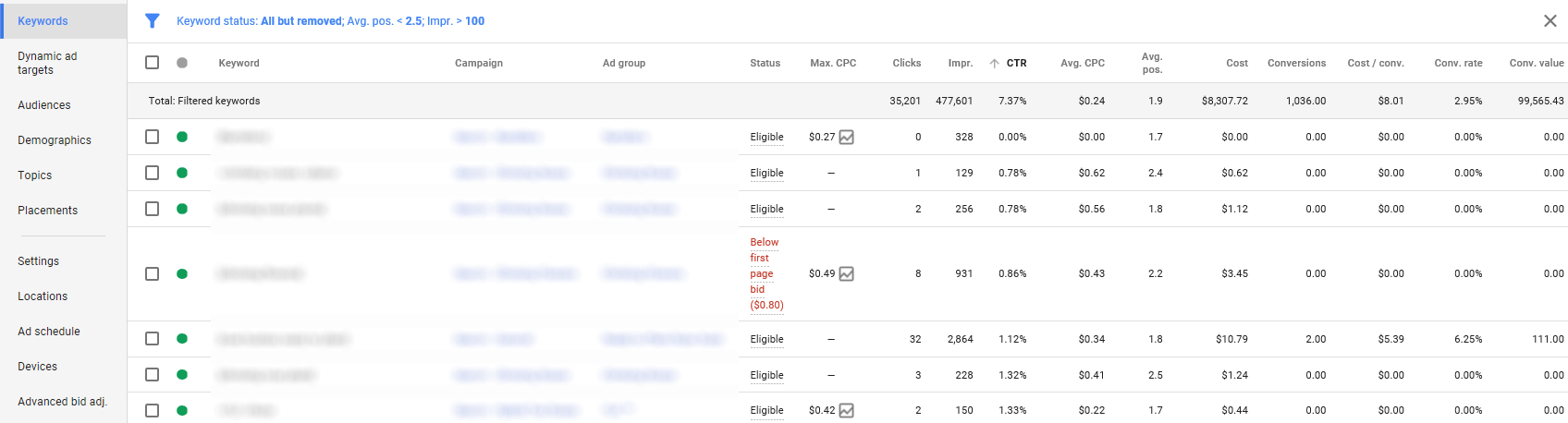
I ignore the “Below First Page Bid” notice here because the average position is 2.2. I also would keep our converting keyword here, because even with a low CTR it’s delivering a good return. However, the first keyword here with 328 impressions and 0 clicks? That probably should be paused. A deeper look at the specific search terms may help find the problem, but this shows you where to dig.
Filter 3: Queries In Need Of Their Own Ad Groups
For this you’ll need to navigate to your search terms report. Then set up a filter for below average CPA (each account is different) and conversions greater than 5. Then sort by conversions high to low. It will look like this:
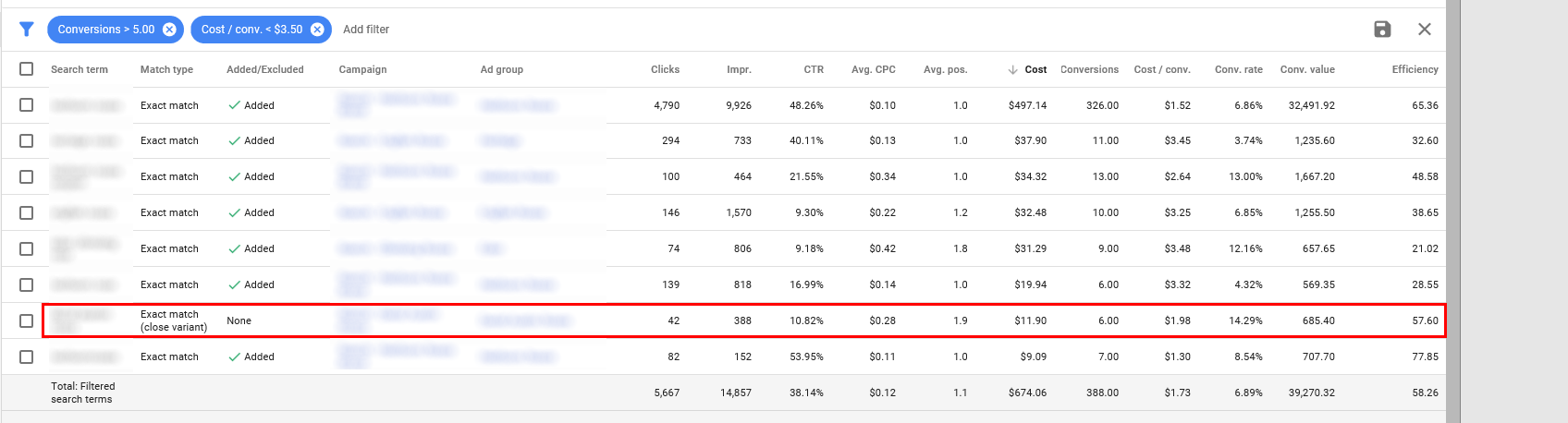
Pay special attention to the Added/Excluded column here because it shows that most of these have already been added as keywords. However, we see one that isn’t yet and based on performance could benefit from being separated out. (for the curious, it’s a misspelling)
About the Author: Robert Brady

The post Mining PPC Search Query Data: 3 Filters Every Account Can Use appeared first on Search Engine People Blog.
(86)