
 Ashley Aptt — November 17, 2017
 — November 17, 2017

Pixabay
When evaluating the performance of AdWords campaigns or keywords, many advertisers don’t look much further than the primary conversion data that AdWords provides. Evaluating conversion volume, cost-per-conversion, conversion rate, and return on ad spend are all-important metrics. But does this paint the full picture? Or could this evaluation tactic be hindering stronger performance during the holiday season?
How Does AdWords Report Conversion Data?
By default, AdWords uses a last-click attribution model. This means that AdWords will assign conversion credit to the last AdWords keyword that resulted in the conversion.
For example, a user searching for boots during the holiday season may begin their search by clicking a Google ad for “women’s boots,” then a day later they click an ad for “women’s black booties,” and then they convert the following day on an ad for “BrandXYZ black booties.” In this situation, AdWords would assign conversion credit to the last keyword that drove the conversion (which would be “BrandXYZ black booties”).
Even though the previous two queries played a role in the conversion process, those keywords don’t get credit for the conversion with last-click attribution. When evaluating performance based solely on conversion data provided with last-click attribution, advertisers don’t get the full customer journey picture and may be de-valuing important keywords based on poor performance.
What Are Assisted Conversions?
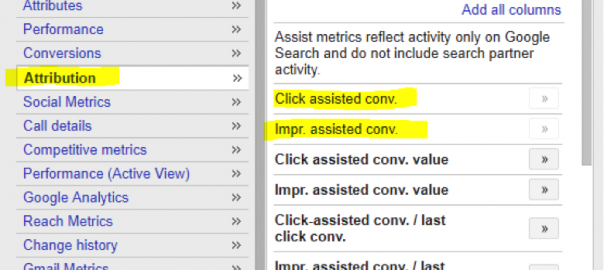
Luckily, AdWords allows advertisers to easily view assisted conversion data within the AdWords interface. Assisted conversions report on the number of conversions that a keyword assisted with even if it wasn’t the last keyword that generated the conversion. You can view ‘Click-Assisted conversions’ or ‘Impression-Assisted conversions’. ‘Click-Assisted conversions’ report on the number of conversions assisted by actual clicks, whereas ‘Impression-Assisted conversions’ report on the number of conversions assisted by impressions even when the user didn’t click the ad. This data is very helpful in determining which keywords drive conversions during the customer journey leading to a conversion.
You may discover that a keyword appears to have poor performance on the surface (when looking only at last-click attribution conversion data), but it could actually be valuable in driving qualified traffic to your site and assisting in the conversion process. In the example above, “women’s boots” and “women’s black booties” both would have received an assisted conversion, but not an actual conversion.

How to Access Assisted Conversion Data
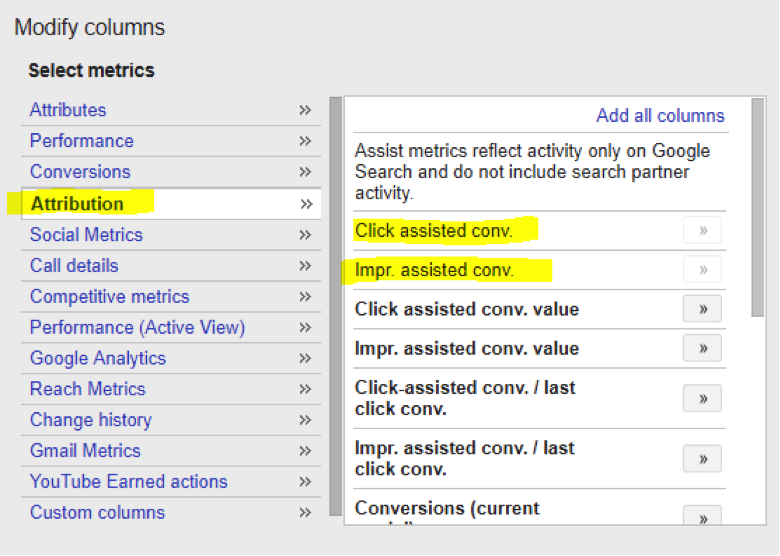
Accessing assisted conversion data within AdWords is very easy! All you need to do is add “Click assisted conversion” and “Impression assisted conversion” columns to your AdWords reports (as shown below).
You can access this data at the campaign, ad group or keyword level and it’ll appear in AdWords reports along with other commonly used metrics such as clicks, impression, cost, etc. Applying these columns to your reporting dashboard allows you to easily access this information and make better-informed bidding decisions.
Why Is This Important During Holiday Season?
During Q4, it’s especially important to evaluate keyword performance using assisted conversion data. The holiday season is notorious for shopping and gift giving, which means that users turn to Google to aid in the process of shopping for the best holiday gifts. Gift-givers often step outside of their comfort zone and search for brands, products, and categories that they’re not familiar with.
Non-brand keywords present a great opportunity for companies to get in front of these users and convert new users during holiday season. However, if you only evaluate performance based on last-click attribution conversion data, you may think these non-brand keywords perform horribly and decide to bid down or pause these keywords. But if you pull in the assisted-conversion data, you may be surprised to see that some of your non-brand terms are indeed aiding in the process of generating conversions, and decide to keep bidding on those terms.
This strategy will allow you to continue generating brand awareness via non-brand terms, and generate more conversions during the holiday season.
Conclusion
Applying assisted conversion data to your AdWords reports is fast and easy. There’s no harm in adding these insights to your dashboard, but the added value from these metrics could produce strong results for your business this holiday season!
Digital & Social Articles on Business 2 Community
(142)