
 Wishpond
Recently, I was looking for some new ways to promote Wishpond’s Facebook page. After doing some research, I soon became unexcited with the same old boring strategies that people have been talking about for more than five years.
So I started to dig deeper and look for some new, less obvious ways to promote our Facebook page. After some serious brainstorming (which to me means more than 5 coffees) I devised six strategies that to promote our Facebook page.
In this article, I’ll share the strategies with you, and how some of them are already being used by top marketers today.
Let’s begin.
#1. Share an infographic and tag other influential Facebook pages in the post
One of the best ways to drive traffic to your Facebook page is by getting an influencer, who has a lot of fans, to share your content on their Facebook page.
The tough part though is convincing that influencer to share something of yours.
Here’s how you do it:
1 . Create an incredible piece of content that features them and is valuable to their audience. We recommend an infographic. In a 2014 study, OKDork found that “infographics receive more average shares than other content types.”
2 . Share the infographic on your Facebook page and tag the influencer’s Facebook page (using the @ symbol) in your post.

3 . That influencer will get a Facebook notification that they were mentioned in your post. And if you’ve done a great job on the piece of content and highlighting the aforementioned influencer, it’s just one click for them to share it on their Facebook page.
#2. Embed a Facebook post in your blog posts
We’ve found a ton of success in increasing sharing on the Wishpond blog by making it easy for readers to share interesting, bite-sized quotes and stats.
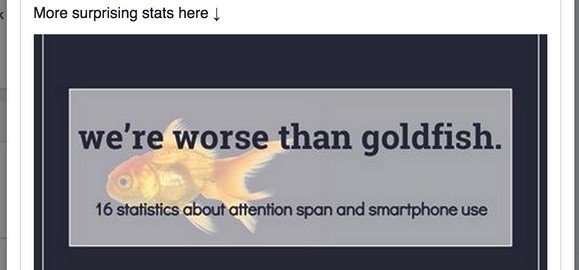
You can hit two birds with one stone by embedding a Facebook post in your blog article that has a shareable quote or stat.
Here’s a great example of this from Amy Porterfield:
This will not only make it easy (and more likely) for a reader to share this on Facebook, but it will also expose your Facebook page to their entire network.
To get the embed code for a Facebook post, just follow these steps:
1 . Click ‘See more options’ under the downward arrow on any post on your Facebook page.

2 . Click ‘Embed Post’ on the next menu.

3 . A window will appear with the embed code and a preview of how your embedded Facebook post will look. From here, just copy and paste the code into your blog post and you’re done.

#3. Your personal social network
This doesn’t mean asking your friends and family to like your Facebook page.
This strategy is a dead-end. Sure you might get your Grandma to like your Facebook page, but you’re not actually going to get them spreading your page throughout their own networks, which is your main goal with this strategy.
So how should you actually do it?
The best way to utilize your personal social network is to treat them just like your actual fans and customers.
You would never annoy them with spammy “Like us!” posts. So why would you do that to your friends and family?
Instead, using your personal Facebook profile, share only those Facebook page’s posts that you know your friends and family will find interesting. This will make it more likely that they will (willingly) engage, rather than make them cringe at filling up their friend’s newsfeeds with pushy promotional posts that will end up making them a social outcast.
#4. Exit Popup on your website
Exit Popups are website popups that are triggered when a visitor is about to leave your website. The majority of exit popups have signup forms to download a piece of content. But if you’re looking to promote your Facebook page, this is a great place to add a like button.
Recently, we saw the team at Quicksprout use this exact strategy with a very simple call-to-action to Like Neil Patel’s Facebook page. They’re using a simple, white, full-screen overlay with just two lines of text and a Like button:

While it may be easy for someone with the name recognition of Neil Patel to get people to Like his Facebook page just by asking, we always recommend you have a more solid ‘selling proposition’ to entice people to click.
Here are three selling propositions you can use to get more people to click like:
“Like our Facebook Page to get exclusive access to Fan-only coupons and freebies,” “Get instant access to our Facebook-only tips and recipes,” “Like us on Facebook to be the first to know about our next giveaway.”
#5. Facebook Posts that encourage comments
While it’s no longer ‘legal’ to ask people to like or share your page posts, you can still ask people to comment. While comments are a bit more difficult to get, they are the best type of interaction you can get on your Facebook posts for two reasons:
1 . Comments are a real two-way communication between you and potential customers. This is the best way to create a personal connection between you and that person, and to show everyone who sees it that you really care about your customers.
2 . When a person comments on one of your posts, it’s very likely that the post will appear in the newsfeed of their friends and family, exposing your page to hundreds of new people.
Here are 3 examples of Facebook posts that encourage comments:
- If you could trade one member of the [local sports team], who would it be?
- Did you watch The Bachelor last night? Let us know what you thought of Jamie’s decision in comments!
- Which do you like better [Option A] or [Option B]? Let us know in comments!
#6. Blog about the best discussions and most popular posts on your Facebook page
If there are discussions happening on the comments of your posts or some of your posts are getting a ton of likes and shares, your audience is going to want to know about it.
Why?
It’s the same reason why social proof (like customer reviews and the number of subscribers on your email list) works so well to improve conversion on landing pages.
People always want to know what other people are talking about. It’s human nature.
So how do you do it?
Here are a few ways you can get people talking:
- If you sell kitchenware, write a blog post titled “Most popular recipes of the month” and embed your most shared and liked Facebook posts of recipes.
- If you get a ton of comments on your blog’s Facebook page about the most recent episode of The Bachelor, write a blog post titled “See what these people’s reaction to last week’s Bachelor was.” In the post you could either embed the article, or write out the comment thread and provide commentary.
Conclusion
Thanks for reading!
Now that you’ve checked out all of these awesome strategies, let me make one request:
Use them to promote your Facebook page and then let me know how successful they were by leaving a comment down below. I’d love to hear how well they worked for you.
Digital & Social Articles on Business 2 Community
(127)