Online Sales Guide Tips
+

Menu

Skip to content
  • Home
  • Our Services
    • Advertisement and Content Publishing
    • Contact Us to Publish
    • Sponsored Content
  • About
    • Disclaimer
    • Privacy Policy
    • Terms and Conditions
    • About Us

How to Tell if Mobile-First Indexing is Enabled

admin January 30, 2020Mobile EngagementEnabled, Indexing, MobileFirst, Telladmin
Hi, Welcome
Welcome back

Kerry Dye — January 23, 2020

If you’re wondering whether your website has been moved over to mobile-first indexing yet, there are two easy ways you can check this.

  1. Use the URL Inspection Tool in Google Search Console
  2. Check for Google Search Console notification emails

Ideally, you’ll want access to the Google Search Console (GSC) account associated with your site(s) but you can also check by using the email account linked to your GSC account.

Method #1: Use the Inspection Tools in GSC
How to Tell if Mobile-First Indexing is Enabled

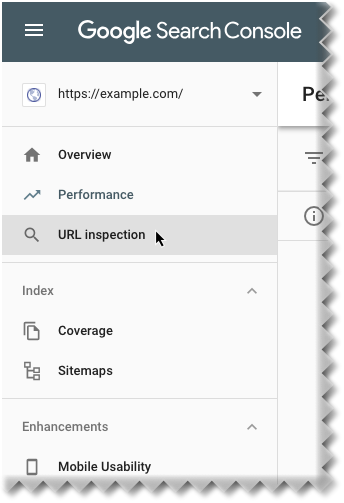
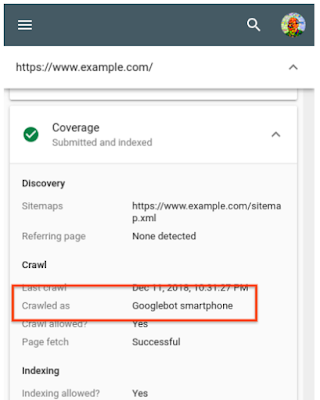
To check in Google Search Console, click on the left-hand menu column and open up the URL Inspection Tool. You can use this tool to check how Google last crawled your domain by looking at the Crawled as section.
How to Tell if Mobile-First Indexing is Enabled

If you see the value “Google smartphone” in this field it means your site has been moved over to mobile-first indexing. If you see the value “Googlebot desktop,” then it’s still waiting.

Method #2: Check for Google Search Console notifications in your email

If you don’t have access to your GSC account, you can still check whether it has been enabled on your site if you have access to the email address assigned to your GSC account.

How to Tell if Mobile-First Indexing is Enabled

If you search for “Mobile-first indexing enabled” in your inbox, you should see any emails from the Google Search console Team notifying you that your site has been moved over.

Mobile-first indexing enabled by default for new sites

Last year, Google announced that all new websites would have mobile-first indexing enabled by default. So, if your site went live after July 1st then it will already have the new indexing format enabled.

Keep in mind that mobile-first indexing will only affect your website if you are running separate desktop and mobile pages. Responsive websites are basically unaffected by the change.

You can find out more about mobile-first indexing by reading our 2020 guide.

Digital & Social Articles on Business 2 Community

Author: Kerry Dye

View full profile ›

(38)

Post navigation

← Grow Your Business in 2020 – 9 Critical Strategies Exposed Why email marketing should work, and why it often doesn’t →

You may also Like

Twitter

Tweeting Without Regret: 7 Top Tips for a Positive, Rewarding Presence on Twitter

Digital Marketing

How Much Should Small Businesses Spend on Digital Marketing in 2017?

Email Marketing Optimization

10 Ways to Avoid Insanity and Automate Your Email

Email List Building

How to send more emails and grow your subscriber list

Customer Service

Customer Service is Crucial for Small Businesses During the Holidays

Video Marketing

Localize Videos For Greater Impact

Webinars Marketing

How to Build A Webinar That Drives Conversions [Infographic]

Growth Strategy

How to Choose Digital Marketing Channels for Long Term Growth

Search Engine Optimization

5 Reasons Social Media Is Important For SEO

Social Media Utilization

Generating Media Attention using Social Media and Newsjacking

SEM & SEO

SEMrush

Recent Posts

  • 5 secrets for success from the former CEO of a $12 billion company
  • Ad Industry Pushes Standards For Transparency In Auctions
  • Why the world’s top talent should bet on Stockholm
  • 30 Bob Ross paintings will be auctioned off in support of public television
  • AI can scale your brilliance — or your mediocrity. Here’s how to stay smart.

Pages

  • About Us
  • Advertisement and Content Publishing
  • Contact Us to Publish
  • Disclaimer
  • Privacy Policy
  • Terms and Conditions

Proudly powered by WordPress | Child Theme by: Crayonux

Report Post

« »


Your Name:

Your Email:

Please tell us why do you think this post is inappropriate and shouldn't be there:


Cancel Report