Online Sales Guide Tips
+

Menu

Skip to content
  • Home
  • Our Services
    • Advertisement and Content Publishing
    • Contact Us to Publish
    • Sponsored Content
  • About
    • Disclaimer
    • Privacy Policy
    • Terms and Conditions
    • About Us

How To Change The Owner Of A Facebook Ad Account

admin February 15, 2017Facebook Advertisementaccount, Change, Facebook, Owneradmin


By Carolina Valdez-Ambia  January 13th, 2017


change-ownership-facebook-account


No matter what, Facebook continues to be a solid source of brand awareness and has now expanded it’s influence into the purchasing funnel.


The percentage of consumers that admit having their purchasing choices skewed by a company’s social media post increases so it’s no surprise many companies have created their business profiles as well as their Ad Accounts to be able to advertise in Facebook.


In many cases, the team members that have access and managerial privileges have to change. It’s easy to perform those changes when the owner of the account stays the same but what happens if you need to change the owner of the account?


Well, you need to follow this simple 5 steps and change it:


1. Go To Your Business Manager Settings In Facebook Business Manager:
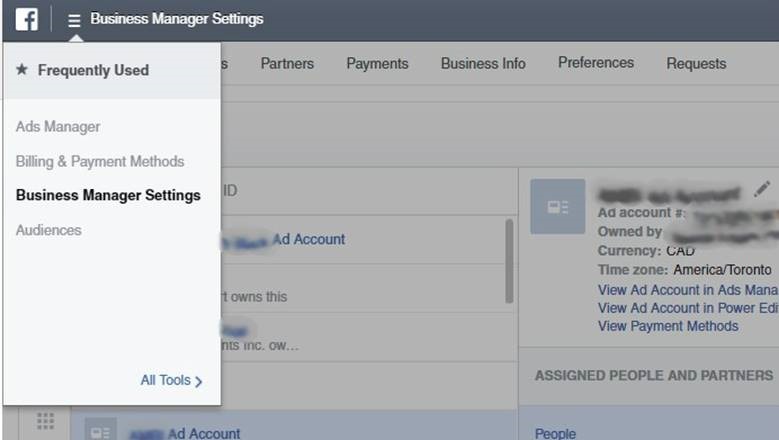

clip_image005

2. Once In Business Manager Settings, Click On Ad Accounts:
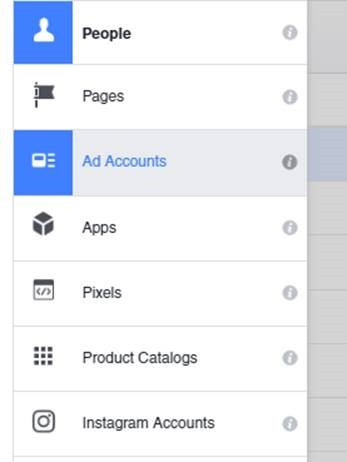

clip_image007

3. Remove All Current Admins And Add The Contact Who Will Take Ownership Of The Account:
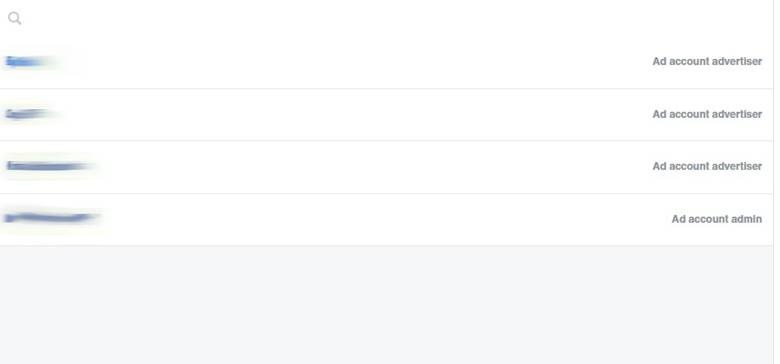

clip_image009

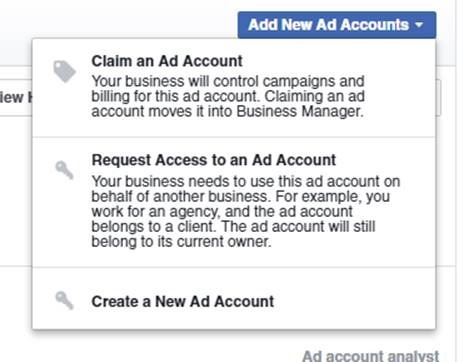
4. Then Have The Contact Who Will Be The New Owner Claim The Account From Their Facebook Business Manager Account:

clip_image011

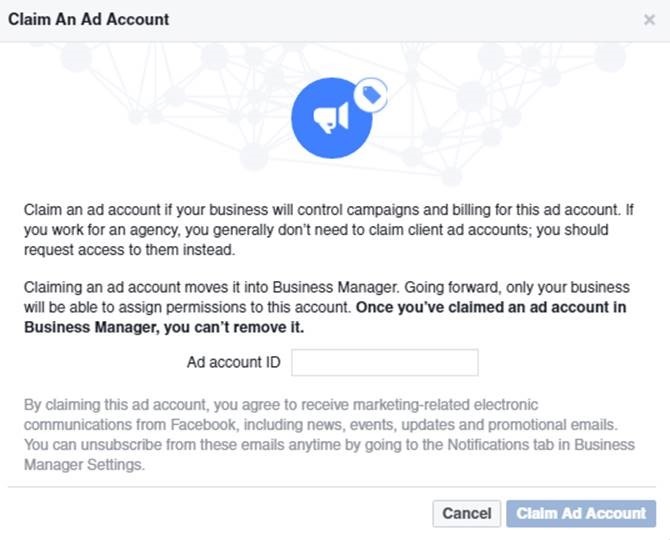
5. Then The New Contact Will Land On A Screen That Will Request Them To Enter The Ad Account ID:

clip_image013

Once they input the Ad Account ID, Voila! You’ve just changed ownership of your Facebook Ad Account.

Pro-Tip


If you’d like to be on the safe side, you can create a corporate email account to manage your Facebook Ad Account so you don’t have to change owners all the time.


About the Author: Carolina Valdez-Ambia


Experienced and driven marketer specialized in digital.

How To Change The Owner Of A Facebook Ad Account

The post How To Change The Owner Of A Facebook Ad Account appeared first on Search Engine People Blog.

Search Engine People Blog

(226)

Post navigation

← How to Empower Your Small Business PR with Thought Leadership 13 Lesser-Known Tricks for Increasing Facebook Engagement →

You may also Like

Website Guidelines

Leverage Web Scraping For Survival in the Post-COVID-19 World

Content Management

Thin Content: How to Diagnose and Fix the Issue

B2B Success

6 B2B eCommerce Best Practices to Implement in 2016

Branding

Four Big Name Brands with Great Social Media Cover Images

Personal Finance

Effective Sales Training Course Pay Huge Dividends To All Who Attend

Black Friday

How This 70-Year-Old Nonprofit Launched a Holiday Gift Site Weeks Before Black Friday –– And Quickly Boosted Their Bottom Line

Conversion Optimization

5 Actionable Tips to Boost Conversions on Shopify — And Make More Money!

Facebook

Facebook’s latest on fake news, misinformation campaigns & user privacy

Personal Branding

Critical Keys For Building a Powerful Personal Brand Through Live Video

Strategy

How to Align Your Strategy to a Customer-First Approach

SEM & SEO

SEMrush

Recent Posts

  • Why relevance now beats reach in the AI-driven buyer journey
  • XChat, the standalone app for messaging on X, is available on iOS now
  • AI startups are inflating a key revenue metric to win VC attention, says this founder
  • Taboola Strengthens Agentic Across Open Web Advertising
  • Wisconsin sues prediction market platforms over alleged illegal sports betting operations

Pages

  • About Us
  • Advertisement and Content Publishing
  • Contact Us to Publish
  • Disclaimer
  • Privacy Policy
  • Terms and Conditions

Proudly powered by WordPress | Child Theme by: Crayonux

Report Post

« »


Your Name:

Your Email:

Please tell us why do you think this post is inappropriate and shouldn't be there:


Cancel Report