
 Mike Parry — March 25, 2018
 — March 25, 2018
Emails don’t need to be static. Modern email applications support a variety of animation techniques and you may be surprised at how flexible the options are.
Animation in web and email marketing certainly has its detractors and not without just cause. Plenty of gimmicky advertising banners and tacky in-your-face GIFs can be found online. These are examples of animation for animation’s sake and a surefire way to cheapen your brand.
But it doesn’t need to be that way. With a bit of restraint and planning, animation can be harnessed to create some truly elegant, eye-catching designs and provide useful information to the customer.
Let’s see what’s in the email animation toolbox.
Animated GIFs
| Pros | Cons | |
| Nearly universal support
Easy to implement |
256 colour limit |
Three decades old, the GIF is a veteran in computing terms and it doesn’t look likely to retire any time soon. With the format’s recent surge in popularity on social media, GIF is no longer a phrase reserved for designers and developers and has now made its way into the vernacular.
The functionality of an animated GIF is simple. It’s an image format which cycles through a number of frames, each of which can be allocated an individual duration. That’s handy when you want to freeze a particular frame for a few moments without wasting bandwidth on duplicates.
Even a two-frame animation can be enough to bring an email to life and capture the reader’s attention. That’s a lot of clout for an image whose file size potentially weighs in at no more than the average static JPEG.
GIFs are limited to a maximum of 256 colours. To put that into perspective, your computer is capable of displaying more than 16 million. This limited colour palette usually isn’t a problem, particularly given the modern trend for minimalistic flat design. What it’s not so good at is rendering photographs, where an unsightly grainy effect is sometimes visible.

Support for animated GIFs is fantastic. Outlook is the only major email client where they don’t work. It’ll show the first frame only so bear that in mind when designing your animation or show something else in its place.
| Summary |
| GIFs are your animation workhorse. They’re reliable, suitable for most simple tasks and a powerful tool in the hands of a talented designer. |
Sprite sheets
| Pros | Cons | |
| GIF-style animation without the archaic colour limit
Synchronisation Suitability for interactive emails Layering effects |
Less support than GIFs
Longer email development time Need to keep an eye on file sizes |
Think of a sprite sheet as a film strip. It’s one long image which consists of a series of still frames:
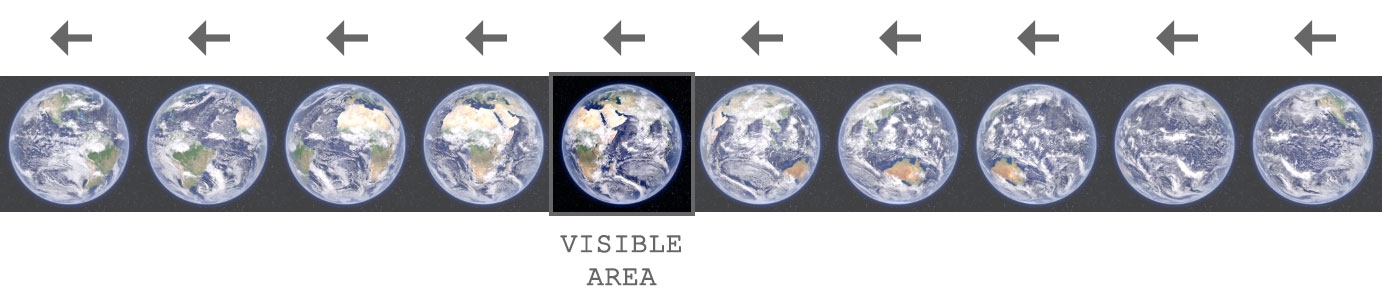
To create the illusion of movement, we pull it along one frame at a time:
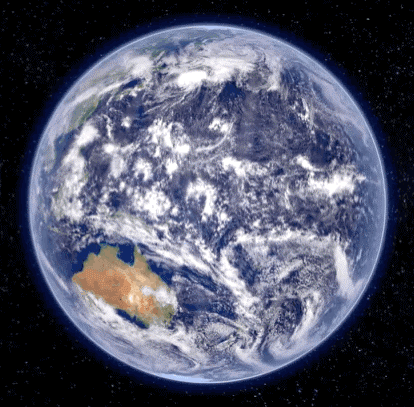
So far, so GIF. You might be wondering why we’d go to this extra hassle to achieve something which can already be accomplished with a traditional animated image. Let’s explore the advantages.
1. Colour depth:
Sprite sheets let us use JPEG as our image format, granting us access to the full spectrum of colours. This eliminates the aforementioned graininess and means that sprite sheets are better suited to cinemagraphs and other animations which incorporate photography.
2. Synchronisation:
Timing is controlled by CSS code so it’s possible to play multiple animations in sync. That’s not doable with GIFs which download at unpredictable rates and start as soon as they’re ready.
3. Layering:
We can use PNG images and capitalize on the format’s alpha transparency feature. By stacking multiple animations and playing them at different speeds we can explore some experimental design options and potentially introduce an element of randomness.
4. Interactivity:
Sprite sheets can be triggered in response to user input. This makes them a powerful asset when developing interactive emails.
Of course, there isn’t quite the same level of support for sprite sheets as there is for GIFs but it’s still pretty good. The webmail services and their mobile apps require a fallback image. That could even be an animated GIF equivalent of your sprite sheet but just be careful not to let the file sizes mount up too much.
| Summary |
| There’s bit less support and a lot more work but sprite sheets can be thought of as enhanced GIFs. |
Video
| Pros | Cons | |
| It’s video
It’s video It’s video |
Limited support
Restrictions on autoplay Video production costs Hosting considerations Potentially heavy bandwidth |
GIFs and sprite sheets are excellent tools to bring some energy to your email but in some respects video remains the holy grail. While the flick book style animation of the other methods has enormous creative potential, sometimes what you really need is smooth playback and audio. That’s only possible with video.
Video in email has had a rough journey which can be summarised as follows:
- It worked
- It didn’t work
- It works again
When we say “it works”, what we actually mean is that there’s a sufficient level of support among email clients for video to be worthwhile. With the popularity of iPhone and iPad, it all hinges on iOS. Video worked in iOS7 but then iOS8 came along and dropped support. Fortunately it was reintroduced in iOS10. What’s more, it works on Samsung’s email app. That’s a pretty good cross section of users and makes video a viable option once more.
You’ll need some fallback content for the less capable email clients. Email on Acid’s guide to video in email delves into the technical details.
It’s worth mentioning that autoplay doesn’t work on mobile and for good reason: you don’t want to help yourself to big chunks of your customer’s data allowance. Mobile users need to press play.

| Summary |
| If you want to present truly dazzling content to your customer, it’s hard to compete with video. You’re not going to show off your new TV advert with an animated GIF. |
CSS animation
| Pros | Cons | |
| Beautifully smooth animation
Minimal bandwidth Animate anything on the page Creative freedom 3D |
Limited support
Fallback strategies need to be considered |
Our final technique is a little different. In contrast to the traditional frame-by-frame animation of our first three methods, CSS animation gives us the power to slide, rotate, scale, flip, fade or otherwise transform any HTML element in our email. It doesn’t even need to be an image – we can apply the effects to whichever shape or text takes our fancy. CSS animation offers huge scope for creativity
Just like the sprite sheets mentioned earlier, CSS animation lends itself well to interactive content. By combining triggers with animations we can create some slick looking and intuitive content such as menus and carousels.

As you’d expect, compatibility is a mixed bag. Your finely crafted animations are going to go unseen if you’re sending a lot of B2B emails to Outlook users. If you’re sending to customers using Apple devices, then you can explore everything which CSS has to offer. With a bit of skill, it’s quite possible to code emails which identify the application’s capabilities and show apt content accordingly.
As clichéd as it sounds, your imagination is the limit. Your animation can be as subtle as a this gently scrolling background:
Or as bold as this 3D spinning cube (our display block block):
That’s right: three dimensions in an email. Such is the inconsistent nature of this medium where some applications struggle with basic text formatting, yet others can render and move objects in 3D space. Although it’s possible to build more complex shapes, CSS 3D is still in its infancy. We’ll be watching keenly as the technology develops. Just imagine giving your customer the option to rotate and zoom your product without having to leave the email.
| Summary |
| Who needs JavaScript? CSS opens up a vast array of functionality and design options and lets us create truly engaging emails. |
Decisions, decisions. GIFs, sprite sheets, video, and CSS animation all have their merits, so picking which method to use depends on what you’re trying to achieve and who your audience is. There’s no one-size-fits-all solution. From an email developer’s perspective, this level of choice is no bad thing. We have a range of tools at our disposal and that makes it possible to build truly captivating emails whatever the goal.
Digital & Social Articles on Business 2 Community
(59)